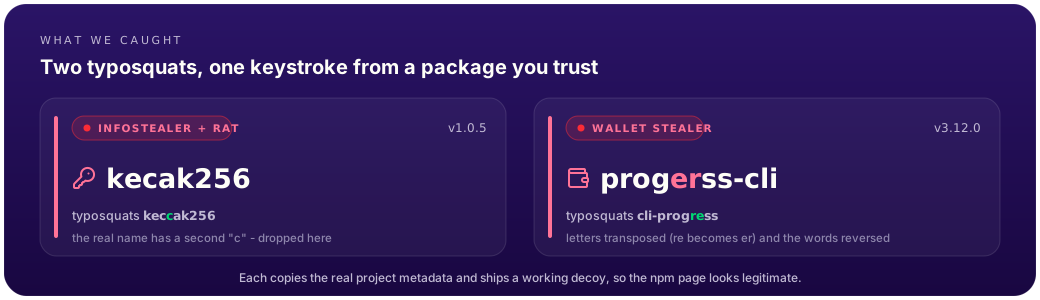
Typosquatting is one of the oldest tricks on a package registry. Publish something one keystroke off a popular package, copy the real project's metadata, then wait for a fat-fingered npm install. It keeps working because the lure costs nothing and the payoff is code running on a developer's or CI's machine.
Here are two we flagged on npm recently. Our behavioral monitor caught both before they showed up in any public malicious-package feed. We disclosed them to npm, which has since blocked both packages, and we filed them with the OpenSSF malicious-packages feed (ossf/malicious-packages#1301) so the rest of the ecosystem inherits the indicators.
The two packages
| Package | Typosquats | Version | What it is |
|---|---|---|---|
kecak256 | keccak256 (one c dropped) | 1.0.5 | Browser-credential infostealer (+ remote command channel) |
progerss-cli | cli-progress (letters transposed) | 3.12.0 | Crypto-wallet & web3 credential stealer |
Both steal trust shamelessly. kecak256 copies the real keccak256 author, description, README and keywords, and even ships a working decoy hash implementation as its main entry, so if you actually call it, it works. progerss-cli points its repository.url at the legitimate cli-progress GitHub repo and lists the real maintainer as author. Glance at either npm page and nothing looks off.
kecak256: the infostealer
The malicious behavior rides on a postinstall hook. It fires the moment the package installs. Nobody has to import it.
The hook launches a small obfuscated launcher that forks on the operating system and kicks off a second-stage process in the background: a detached, hidden child that outlives the npm install that spawned it. Stage two is where the theft happens. In summary, it:
- checks for elevated privileges,
- targets local browser credential stores (the kind of SQLite stores where saved logins live), plus a couple of other credential artifacts,
- bundles what it collects into an archive (staged as
npmupdate.zip), - and exfiltrates that archive over HTTP, uploaded in chunks rather than in one request.
The command-and-control endpoint is obfuscated and assembled at runtime, so it isn't sitting in the source in plain sight. We got it two ways. First we decoded the obfuscated string statically. Then we ran the stage-2 payload in a sealed sandbox, with its traffic pointed at a local sinkhole so nothing real ever left the box, and watched it build the address and reach out. One thing worth being honest about: the stealer only runs this stage on Windows and macOS, so on our Linux sandbox we had to fake that environment to coax it past the check. Both methods landed on the same place:
hxxps://erumfl[.]nmailhub[.]com/?id=<per-victim-id>
There's more, and in the sandbox we watched it happen. The same endpoint gets polled with a state=true parameter (the GET /?id=…&state=true left for our sinkhole over TLS), and the response comes back as a newline-separated list of commands the package then runs. So this isn't only a stealer. It leaves a lightweight remote-command channel behind that keeps checking in. A typosquat that grabs your saved logins on install is bad enough. One that also takes orders afterwards is worse.
progerss-cli: the crypto-wallet stealer
progerss-cli is the more patient of the two, and the more targeted. Its postinstall runs a small loader whose only job at first is to wait. It polls for its exfiltration dependency to finish installing before it loads the real payload.
That detail is worth sitting with. A naive install-time scanner inspects a package the instant it lands (before the dependency tree has settled) and sees a loader that does almost nothing, so it moves on. The actual payload, a fat obfuscated blob, only runs once the pieces it needs are in place.
The payload is gated, too. It doesn't fire blindly. It scans the machine for cryptocurrency and web3 developer material: wallet files, keystores, seed phrases, exchange and wallet-app data, the config files of common smart-contract toolchains. The embedded target list reads like a who's-who of the space: MetaMask, Bybit, Unisat, Solflare, Rabby, plus Truffle, Foundry and Solidity project files (wallet.json, keystore.json, secrets.yml, config.yml, anything that looks like a mnemonic or seed phrase). On a machine with none of that, it stays quiet.
To confirm what it does, we detonated it in a fully isolated sandbox: a throwaway machine with no network path to the internet, seeded only with decoy wallet files, all traffic captured locally. The payload found our bait and tried to upload each file, one HTTPS request per file, as multipart/form-data, to:
hxxps://rabbylgh[.]to:8443/upload
The host, rabbylgh[.]to, is itself a typosquat, this time of the Rabby crypto wallet. Every byte the sample sent went to our local capture and never reached the real server. The decoded string table is full of crypto terms and Chinese-language labels (小狐狸, the nickname for MetaMask, 币圈 for the crypto scene, plus seed-phrase and exchange keywords), so the intended victims are clearly crypto developers. We read that as a signal about targeting and language, not as attribution. Strings like these are trivial to copy or plant, so we are not naming who is behind it.
The common fingerprint
Strip away the specifics and the two share a shape:
a brand-new package, named one edit away from a high-download target, with an automatic
postinstallthat pulls in an HTTP-exfiltration toolchain and runs obfuscated code.
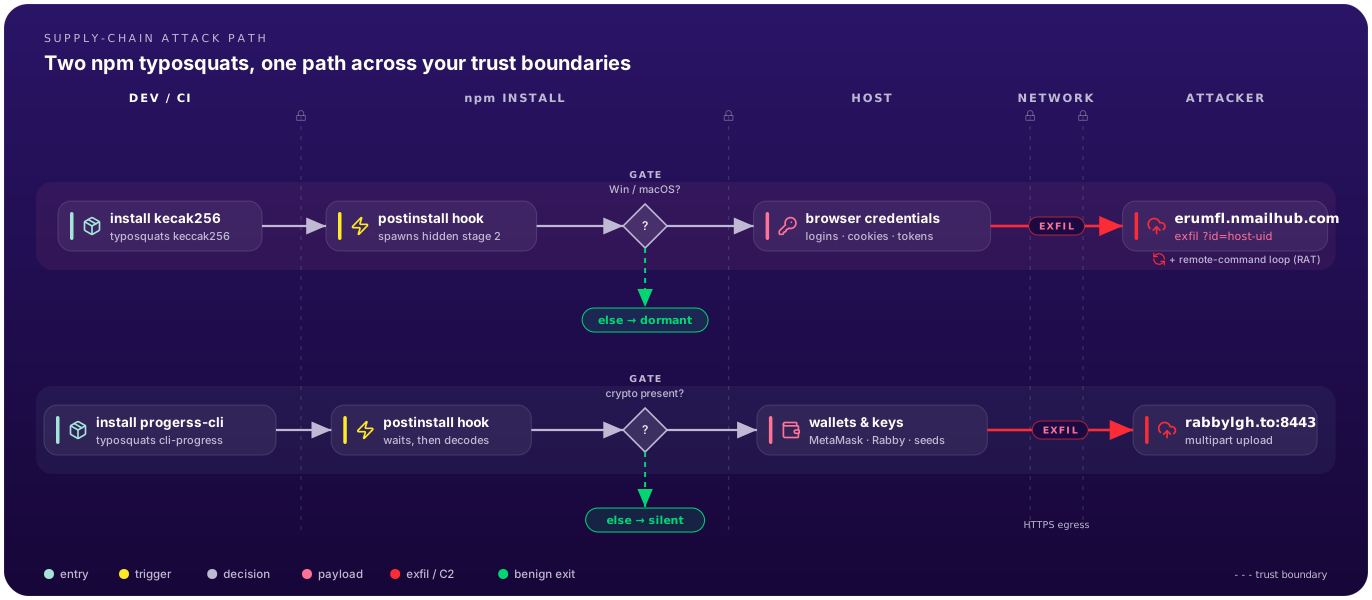
Same skeleton, different payload: kecak256 goes after browser credentials and leaves a remote-command channel, while progerss-cli waits out the first scan, then goes after crypto wallets and keys. Both cross the same trust boundaries, from your install step to an attacker's server, and both stay quiet until their gate condition is met.
That shape is what flagged them. Not a payload signature, not a known-bad hash, not a public feed listing. Neither was listed anywhere when we caught them. The behavior is the tell. Signature-based and feed-based defenses are necessary, but they're always a step behind: something has to be seen and catalogued before they can match it. Watching the behavior is what buys you the lead time.
One more thing worth flagging. Both payloads only show their hand under the right conditions. The infostealer hides its C2 behind runtime decoding. The wallet stealer stays silent until it finds crypto material. We ran both in an isolated sandbox with no path to the internet, seeded with decoy data, every byte captured locally, and watched each one reach for its C2 (for the infostealer we also decoded the endpoint statically, as a cross-check). No real machine or real credential was ever at risk.
Indicators of compromise
Both were caught and reported on 2026-06-08. Use these to hunt your logs, block outbound, or seed a detection. The package name and version are the most durable indicators. The domains can be rotated, but the file hashes cannot. The network indicators below are defanged, so defang them back before use.
kecak256@1.0.5 (browser-credential infostealer plus command channel)
- C2:
hxxps://erumfl[.]nmailhub[.]com/?id=<host-uid>(exfil, and a command poll with&state=true) - Host:
erumfl[.]nmailhub[.]com. Block the full host rather than the parentnmailhub[.]com, which may be shared. - The beacon is gated to Windows and macOS, and the
idis derived from the host machine UID. - Stages
npmupdate.zip, uploaded in chunks over HTTP. - SHA-256:
init.m.js97582ce44686edb95b9fbd3f2ea32b8b82b2a976ed41d71e432583546f5a03e8,upchk.m.js(stage 2)8b23caa77fb9d9a9d12780c3b807cb7b563b757656e00546761077494cad9ae3
progerss-cli@3.12.0 (crypto-wallet and web3 stealer)
- C2:
hxxps://rabbylgh[.]to:8443/upload(note the:8443) - Host:
rabbylgh[.]to, a typosquat of the Rabby wallet. - Exfil is a
multipart/form-dataPOST, form fieldfile, one request per stolen file. - SHA-256:
build-helper.jsf8c36460693a53c53442cae2d43174171cfdd2b26372e92525a9d99134206f56,index.js(payload)8e3f7761b67a15ca40e6ab7be497c588e465b8b6437210eb202e6d34da9c0589
Takeaways for engineers
postinstallis an execution surface, not a build detail. An install script is code you're about to run with your developer's or CI's privileges. That's all it is. Turning scripts off in CI (ignore-scripts=truein.npmrc) kills this whole class of trigger, but plenty of legitimate packages need their postinstall to build native code (esbuild,sharp, anything onnode-gyp), so a blanket flag will quietly break those builds. Pair it with an allowlist (pnpm'sonlyBuiltDependencies, or@lavamoat/allow-scripts) and rebuild only what you trust. The stronger control sits one layer down: default-deny egress on your CI runners, so an install step that tries to phone home just fails.- Typosquats survive on a glance. Copied metadata plus a working decoy means "it looks legit and it works" tells you nothing about whether it's safe. Check the package name and the publisher before you add a dependency.
- If you work on anything crypto, your dev box is a named target. The
progerss-clipayload went straight for wallets, keystores and seed phrases. Keep signing keys and seed phrases off general-purpose dev machines (hardware wallets, dedicated or air-gapped signers), and never leave a plaintext mnemonic sitting in a repo or a home directory. - Install-time scanning isn't enough on its own. The wallet stealer proves it: a payload can wait out an early scan and stay dormant until it finds what it's after. You need defenses that reason about behavior across the whole install, not just the first snapshot.
We've disclosed both packages through the standard channels so the rest of the ecosystem benefits. Think you may have pulled either version? Treat the whole machine as compromised, not just the files the malware named.
For kecak256, remember the stage-2 process detaches and keeps running after the install finishes, so find and kill it first, then check the usual persistence spots: a LaunchAgent on macOS, a ~/.config/autostart entry or user systemd unit on Linux, a Run key or scheduled task on Windows. Then rotate everything the host could reach, not just browser passwords: npm tokens, cloud CLI credentials, SSH keys, and any secrets your CI injects. It lifts cookies too, so revoke active sessions, otherwise a rotated password still leaves the attacker logged in.
For progerss-cli, any wallet, keystore, or seed phrase that sat on that machine is burned. Generate fresh keys on a clean, ideally hardware-backed device and move funds to those, never to a wallet whose seed ever touched the infected host. Rotate the non-wallet secrets it also collects, like anything in secrets.yml or config.yml.