Bug bounty platforms have gotten good at filtering obvious junk. HackerOne's Hai removes roughly 90% of submissions: spam, out of scope, AI-generated slop. That layer works.
What's left is the 10-20% that passed initial triage. These reports look plausible. They reference real endpoints, real versions, sometimes include PoC code. But looking plausible is not a verdict. The only way to know if a report describes a real vulnerability is to reproduce the exploit. And reproduction means deploying the target application from scratch, at the right version, with the right config, in a controlled environment you built from the report.
We built an engine that does this with AI agents. The exploit phase gets the attention, and it is genuinely hard: multi-step attack chains, victim simulation, evidence collection. But when we started shipping, we found that deployment is the pivotal gate. Get the lab wrong and the best exploit agent in the world produces a false negative. Get it right and even a straightforward attack can deliver a clean verdict.
The gap between a report and a running app
A bug bounty report gives you an endpoint and (if you're lucky) a proof-of-concept curl command. It does not give you a deployment guide.
A researcher reports an SSRF in your webhook handler. To reproduce it, you need your application running with webhooks enabled, outbound network access configured, and a listener to catch the callback. The report gives you a curl command. It doesn't say how to get your app into a state where that request does anything.
Another report claims a path traversal in a plugin your app ships. You need the right version deployed, the plugin installed and enabled, a user account with the right permissions, and the full plugin API chain reachable. The report gives you the traversal payload. It doesn't mention that the plugin has its own auth layer, or that it requires a specific database migration to be present.
Every reproduction has the same shape: the report describes the attack, not the setup. The gap between "here's the vulnerability" and "here's a running app you can exploit" is the actual challenge. Everything downstream (the exploitation, the evidence collection, the verdict) is blocked until it's solved.
What blind deployment looks like
When you deploy your own application, you have Helm charts, CI/CD pipelines, runbooks, and colleagues who know where the config file lives. When you deploy someone else's application at a specific historical version on a fresh EC2 instance, you have none of that.
We call this "blind deployment": reconstructing a working deployment from the outside, without the institutional knowledge of the team that built the software. In our pipeline, an AI agent does it autonomously. It has SSH access to the target EC2 instance, a cloned copy of the source code, and a deployment plan produced by a previous agent that analyzed the report and the codebase. From there, it writes docker-compose.yml files, .env configs, and seed scripts, transfers them via SCP, runs docker compose up, and watches what happens.
Three design principles emerged from building this system:
The plan is a guideline, not gospel. A planner agent analyzes the report and the codebase, producing a structured deployment plan. Here's a simplified excerpt from the actual plan for the Mattermost CVE we'll walk through below:
{"app": "mattermost","version": "9.11.7","docker_image": "mattermost/mattermost-team-edition:9.11.7","seed_data": {"users": [{ "username": "admin", "role": "admin" },{ "username": "attacker", "role": "user" }]},"cve_prerequisites": {"required_features": ["Boards/Focalboard plugin enabled"]}}
But the plan is always partially wrong. The Docker image might behave differently than the docs suggest. A plugin the plan says is "enabled by default" might not be. The deployer treats the plan as a starting point and adapts when reality diverges.
First attempt never works. We designed around the assumption that the initial docker compose up will fail. The agent's core loop is: deploy, check health, read logs, diagnose, fix files, redeploy. This is the debug cycle a human would do, and it's why deployment is an agent problem rather than a template problem. Templates work for the happy path. Agents work for everything else.
The deployer must verify the full exploit path, not just the health check. A running app with a passing health check is not enough. The deployer authenticates as the attacker user, hits the vulnerable endpoint with a benign request, and confirms the entire chain is reachable from the attacker instance. Only then does it hand off to the exploit phase. This catches a whole class of failures (wrong network topology, missing CSRF headers, broken plugin routes) that would otherwise surface as false "not reproducible" verdicts.
Between deployment and exploitation, a lightweight sub-agent (the smoke test) verifies that the exploit chain is complete: start a TCP listener for SSRF, send a benign probe and grep for reflection, hit a protected endpoint without credentials. This is a gate, not the exploit itself. If the smoke test passes, a separate attacker agent takes over and replays the full exploit from the attacker's position, producing forensic evidence of exploitability. If it fails, the pipeline aborts before spending compute on that attack phase.
CVE-2025-20051: a Mattermost walkthrough
Here's a real example. CVE-2025-20051 is a path traversal in Mattermost's Focalboard plugin (an embedded kanban board). The exploit is conceptually simple: any authenticated user can create a board attachment with a traversal path like 7abc/../../../../etc/passwd as the file reference, then trigger a duplicate operation that copies the targeted file into the boards data directory, making it readable via the API. Server config, database credentials, SSH keys, anything on the filesystem.
For the deployer agent, that means standing up: Mattermost 9.11.7, PostgreSQL, the Focalboard plugin enabled, a team, an attacker user with membership, and the full plugin API reachable. Here's the docker-compose.yml the agent wrote and deployed:
services:db:image: postgres:13.23-alpineenvironment:POSTGRES_USER: mmuserPOSTGRES_PASSWORD: mmuser_passwordPOSTGRES_DB: mattermosthealthcheck:test: ["CMD", "pg_isready", "-U", "mmuser"]interval: 10sretries: 10mattermost:image: mattermost/mattermost-team-edition:9.11.7depends_on:db: { condition: service_healthy }environment:MM_SQLSETTINGS_DATASOURCE: >-postgres://mmuser:mmuser_password@db:5432/mattermost?sslmode=disableMM_SERVICESETTINGS_SITEURL: http://${TARGET_IP}:8065MM_SERVICESETTINGS_ENABLELOCALMODE: "true"MM_PLUGINSETTINGS_ENABLE: "true"MM_TEAMSETTINGS_ENABLEOPENSERVER: "true"ports: ["8065:8065"]volumes:- ./volumes/app/mattermost/config:/mattermost/config:rw- ./volumes/app/mattermost/data:/mattermost/data:rw- ./volumes/app/mattermost/plugins:/mattermost/plugins:rwhealthcheck:test: ["CMD", "curl", "-sf", "http://localhost:8065/api/v4/system/ping"]interval: 15sretries: 20start_period: 60s
Looks reasonable. Here's what actually broke.
Container crash on startup
Mattermost runs as uid 2000 inside the container. The bind-mounted volume directories were created by root. Permission denied on config.json.
Agent fix: Read container logs, identified the uid mismatch, ran chown -R 2000:2000, restarted.
Silent password corruption
The plan specified passwords with !. Users were created successfully, but login returned "Password field must not be blank." mmctl silently mangled the special character.
Agent fix: After debugging with curl, Python, and raw HTTP inspection, reset passwords via mmctl change-password with simpler strings.
Plugin prepackaged but not installed
The plan said "Focalboard is bundled and enabled by default in 9.11.x." Wrong. The tarball existed in /mattermost/prepackaged_plugins/ but was never extracted.
Agent fix: Listed the directory, found the tarball, extracted it into /mattermost/plugins/, enabled via mmctl --local plugin enable focalboard.
Undocumented CSRF requirement
With the plugin enabled, every Focalboard API call returned 400 checkCSRFToken FAILED with valid Bearer auth. The main Mattermost API doesn't require this.
Agent fix: Discovered the plugin has its own CSRF layer requiring X-Requested-With: XMLHttpRequest on every request.
Wrong API path in the report
The report said POST /teams/{teamId}/boards. That endpoint returned HTML (the Focalboard SPA), not JSON.
Agent fix: Tested paths systematically. The correct one is POST /boards with teamId in the request body.
Exploit payload crashes the server
The report's PoC used ../../../etc/passwd. This caused a Go panic: slice bounds out of range [1:0].
Agent fix: Read the Go source code inside the running container. Traced getFileInfoID(): it calls strings.Split(fileId, ".")[0][1:], which panics when the string starts with .. Crafted a working payload: 7abc/../../../../etc/passwd.
65 turns. 18 minutes. Five structured deployment lessons written for future Mattermost reproductions. Every one of those problems would have been a dead end for a script, but they're the kind of thing an agent can reason through: read logs, read source code, form a hypothesis, test it, adapt.
Knowledge that compounds
The first Mattermost reproduction took 65 turns and produced five deployment lessons. The second time we reproduced a Mattermost CVE, those lessons were injected as context. The agent skipped the problems it already knew how to solve.
We structure this as a chain of agents where each one's output feeds the next, and lessons flow back upstream:
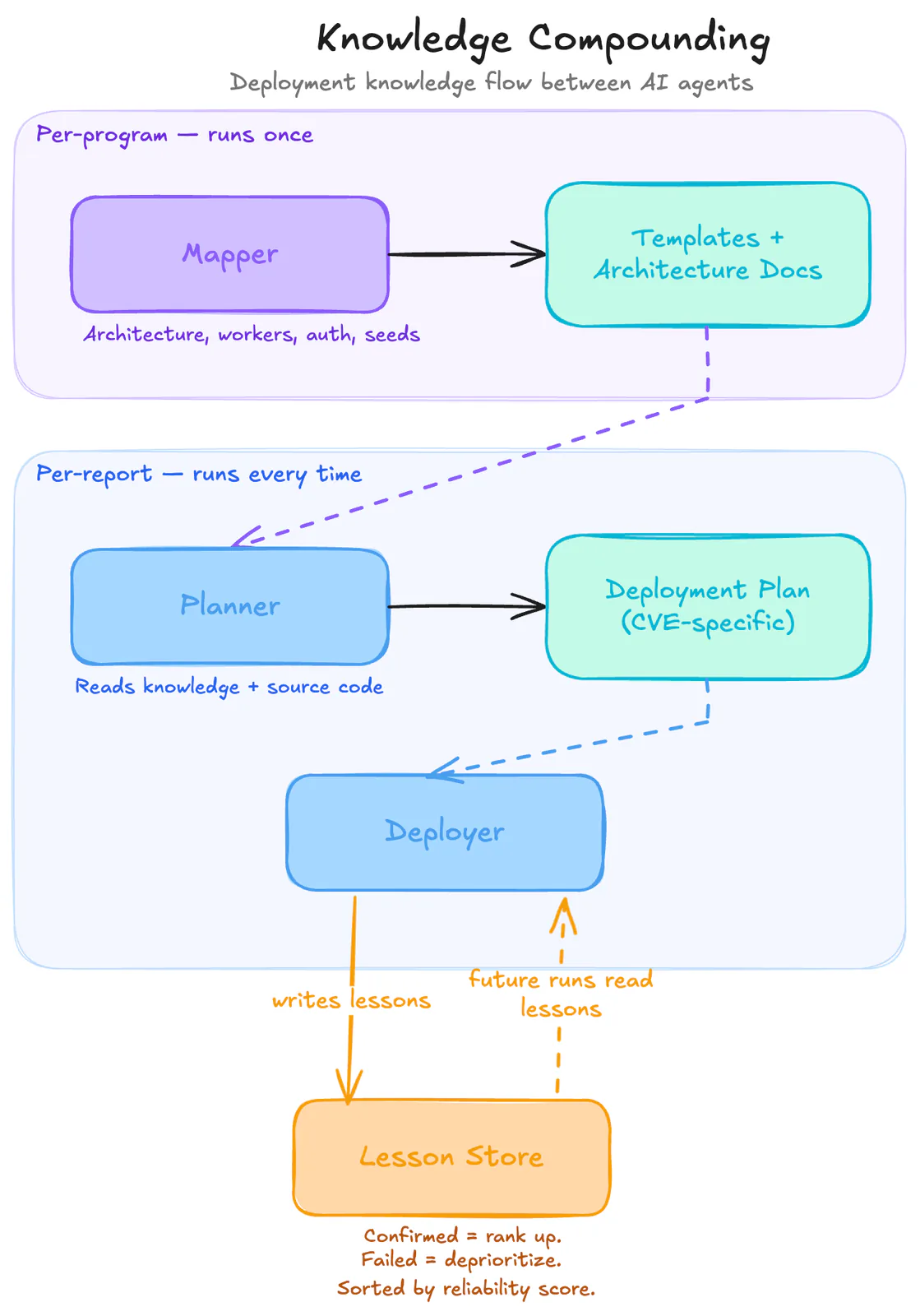
The mapper runs once per program and pre-analyzes the ecosystem: architecture, worker types, auth mechanisms, seed patterns. It produces reusable deployment templates. The planner takes a specific report, reads the mapper's knowledge alongside the source code, and outputs a CVE-specific deployment plan. The deployer merges both inputs, handles everything that doesn't match, and writes new lessons when it discovers something unexpected.
Here's an actual lesson the deployer wrote after the Mattermost run:
# Focalboard plugin is prepackaged but not auto-installed in 9.11.7## ProblemThe Focalboard plugin tarball exists at`/mattermost/prepackaged_plugins/focalboard-v8.0.0-linux-amd64.tar.gz`but is NOT automatically installed or enabled.The Focalboard API returns 404.## SolutionExtract the tarball and enable via mmctl:docker exec <container> sh -c \'cd /mattermost/plugins && tar xzf \/mattermost/prepackaged_plugins/focalboard-v8.0.0-linux-amd64.tar.gz'docker exec <container> mmctl --local plugin enable focalboard## Metadata<!-- lesson_json:{"stage":"deployer","component":"mattermost-focalboard","applicable_versions":["9.11.7","9.x"],"tags":["mattermost","focalboard","plugin"]} -->
The next deployer that encounters a Mattermost 9.x target with a Focalboard dependency will receive this lesson as context, skip the 404, and go straight to the extraction step. Lessons confirmed in subsequent runs rank higher. Lessons that led to failures get deprioritized. The 100th reproduction against a given application is dramatically cheaper than the first.
This is where automated reproduction diverges from manual triage. Manual knowledge lives in people's heads and leaves when they do. A system that compounds institutional knowledge across hundreds of reproductions creates an advantage that grows with every report it processes.
We're actively building toward a world where "reproduce this report" is a one-click operation, and we'll have more to share soon.
Want to talk about this?
We're always happy to geek out about deployment nightmares and reproduction edge cases. Reach out at konvu.com/demo or find us at upcoming security conferences.